Give your agents a home: our shared Mac mini AI workbench
Four people share one always-on Mac mini as a Claude Code workbench: per-person config dirs, scheduled headless runs, and real logged-in browsers. A setup report and a position: agents need a permanent home.
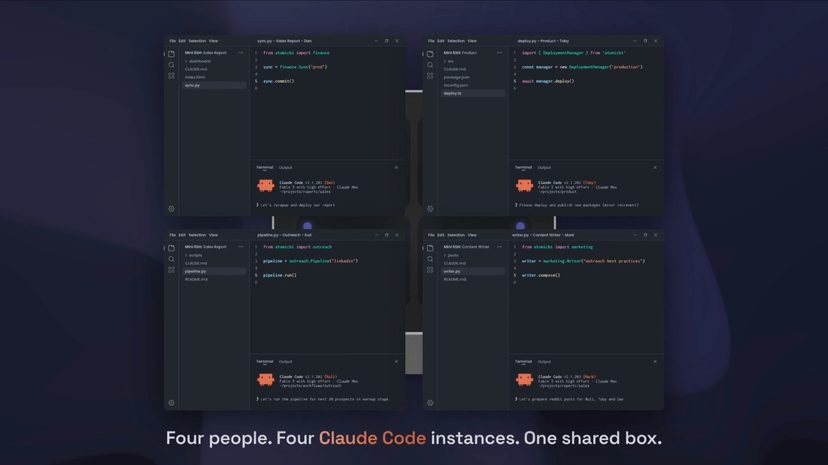
Every AI agent setup I ran before this one had the same failure mode: it lived on my laptop. Close the lid and the agent stops existing. The scheduled job never fires. The logged-in browser session it depends on is suspended. A teammate who wants to check what the agent did can’t, because “the agent” is a process on my machine, behind my login, gone until I’m back at my desk.
The fix for our team was not a better model, a better prompt, or a better framework. It was a permanent address. We put a Mac mini in the office, kept it awake, and moved the agents there. That leads to the position this post exists to argue: multiplayer AI work is an infrastructure problem before it is a model problem. An agent that dies when you close the lid is a tool. An agent with a home is infrastructure.
The contestable half of that position is the hardware choice. I think a shared physical machine, a pet in the pets-versus-cattle sense, beats per-laptop agents and also beats a cloud VM for this specific workload. People who run everything in containers or on a VPS will want to argue, and they should.
This is a setup report and a position, given away in full so you can replicate it or argue with it.
The box
A base Mac mini: Apple M4, 16 GB of RAM. It stays awake because caffeinate runs on it, which is about as unglamorous as infrastructure gets. That is the entire hardware story, and it is deliberately boring. The point is the pattern, not the machine; everything below would work the same on whatever always-on box you already have.
Four of us share it: dan, toby (me), ruli, and mark.
Multiplayer Claude Code on one OS user
The first thing a shared machine surfaces is that Claude Code assumes one user per machine. Four people SSHing in as the same OS user would normally share one login, one history, one set of settings, and step on each other constantly.
The workaround is small. Claude Code respects a CLAUDE_CONFIG_DIR environment variable, so a wrapper script at ~/bin/claude shadows the real binary: claude toby sets CLAUDE_CONFIG_DIR to ~/toby/.claude and execs the real CLI; claude dan points at ~/dan/.claude. Four config dirs exist today, one per person, each with its own auth, settings, history, and sessions. Whole mechanism: one short shell script and a naming convention.
Four config dirs also means four Claude accounts, each on its own subscription. The wrapper shares the machine, not a login: pointing four people at one subscription breaches Anthropic’s terms, and fairly so, since a subscription is already a generous deal against the same usage at API prices. It’s also just a worse setup. One shared account means one shared memory, shared claude.ai connectors, agents mixing up whose MCP accounts they act through, and no view of what any one person actually uses.
What this isolates is exactly one thing: it keeps four people’s Claude accounts, histories, and settings from colliding. Everything else is shared. One OS user, one filesystem, and project-level .claude/ directories inside repos are shared too (anthropics/claude-code#3833). That’s the design, not a gap. The mini is a team surface: everyone has full access to everyone’s projects, so anyone can peek at a teammate’s work, jump into the same project, or take over a session that needs a human. Work that lands on the mini is transparent team work by definition; personal projects belong on your own device, under your own Claude account. If your team needs harder walls than that, this pattern isn’t the one.
State that cannot live on a laptop
The strongest argument for the shared box is state that has nowhere else to live. Four always-on, headed, real-Chrome instances run in the mini’s GUI session, one for each of us, each with a persistent profile holding live logged-in sessions. LinkedIn is logged in on all four. Each Chrome exposes the Chrome DevTools Protocol (CDP) on a localhost port (9222-9225). The day-to-day pattern is simpler than it sounds: we work on the mini itself over VS Code Remote SSH, so the Claude Code session driving a browser talks to CDP over localhost (socat also relays the ports onto our Tailscale network, but that’s the exception, not the point). We drive them with agent-browser, a browser-automation CLI from Vercel Labs (no affiliation with Anthropic, or with us).
This is the part a cloud VM handles worst, and it’s the core of my local-macOS case. These are not headless scrapers. They are real desktop Chrome profiles that a human can sit in front of, log into, clear a checkpoint on, and hand back to the agents, and the logins persist across restarts. They also ride the office’s residential IP. A browser on a cloud VM announces itself with a datacenter IP, which anti-bot systems commonly treat with suspicion before any automation has done a thing; a real Chrome on a residential line just looks like the office it is.
We use official APIs where they exist. But many platforms wall off AI access entirely, and a real headed browser with a live logged-in session is what still works there. The pattern needs tending: logouts happen, site UIs change, and automating a logged-in site can violate its terms, so it’s a deliberate per-platform choice, not a default.
The scheduler: agents that run whether anyone is looking
The piece that turned the mini from a shared computer into infrastructure is a small custom scheduler service. Schedules live in SQLite and sync into a generated crontab; each job is pinned to one person’s config dir; each run spawns claude -p headless with the --dangerously-skip-permissions flag. Seven jobs are enabled today. The highlights, not hypotheticals: a daily LinkedIn buyer-intent hunt running as ruli, Google Meet transcript imports, summaries posted to Lark, running as dan, a weekly content-drafting run as me, and a scheduler-health monitor that watches the scheduler itself. That last one exists because unattended automation fails silently, and I’d rather have the watcher than the surprise.
The per-user pinning matters more than it looks. A scheduled job doesn’t run as some anonymous service account; it runs as dan’s Claude, with dan’s settings and history. When it does something odd, there’s a person whose context explains it.
The other half of trusting unattended jobs is hearing from them. Our automated tasks post brief updates into a Lark channel the whole team reads: a daily bank balance, new customers as they come in, and a failure alert when a job breaks. That channel closes the loop. Automation you never hear from is automation you quietly stop trusting, and a shared feed where both the results and the failures land is what lets us leave these jobs alone.
Beside the cron side sits an event-trigger engine: external events arrive as HMAC-verified webhooks, pass through zero-token pre-filters, and are subject to per-day caps before any model is invoked, so a noisy source can’t burn a day’s budget. The most interesting trigger is also the one I have to describe carefully: a WhatsApp-message trigger, where a message to a designated number would fire a run. The wiring exists and it is currently parked. Zero live sessions, zero registered webhooks, the one trigger row disabled. It’s a design example today, not a live feature.
The WhatsApp side deserves its own warning. The gateway is OpenWA (rmyndharis/OpenWA on GitHub, 10.6k stars as of 2026-07-04), a self-hosted NestJS HTTP API over WhatsApp Web automation. That automation is unofficial, it is against WhatsApp’s terms of service, and accounts do get banned for it. The only sanctioned path is the official WhatsApp Business API through a business solution provider. If that risk isn’t acceptable to you, skip this part entirely; the rest of the setup doesn’t depend on it.
Where the output goes
Agents that run while nobody watches need somewhere to put results. Claude is genuinely good at producing self-contained HTML reports, so we lean into that: a small Bun/Hono service hosts versioned HTML reports per project (six projects live today), deployed by a skill that copies files and atomically moves the new version into place. It sits behind a single shared access key, fronted at a hostname that resolves only inside our Tailscale network. Whether a shared key is enough comes down to the trust model, which gets its own section below.
Working on the box day to day
Day to day, the mini is just a remote dev machine: VS Code Remote SSH for the editor and a terminal Claude Code session inside it. Remote SSH scopes you to the opened workspace, though, and on a shared machine you constantly want to look elsewhere: another person’s project, a log directory, screenshots an agent left behind. We’ve built a few small VS Code extensions to close gaps like that and to smooth the landing for teammates coming from Claude Desktop, which is a much more limited environment than VS Code with the Claude Code CLI: a full-filesystem remote file browser, a browsable folder picker, a media gallery for previewing remote images.
If you copy this, know what makes it work
The load-bearing piece is trust, not hardware. We’re a small team with full mutual trust, and that is why the whole design holds: one shared OS user, everyone connecting over SSH with authorized keys across our Tailscale network, a scheduler dashboard with no authentication by design, scheduled runs that skip Claude Code’s permission gate, and a box where anyone with access effectively holds everyone’s browser sessions and agent state. Each of those is a convenience we chose on purpose, and each only makes sense inside that trust. In a larger business this doesn’t work as-is; the shape that does is isolation at team level, a private VPN and a mini per small team.
The isolation question has a second honest answer: macOS can do real multi-user, separate OS users with protected home folders on this same box. We ran it that way for a while and dropped back to a single user, because the day-to-day overhead wasn’t worth it inside full trust. A cloud VM makes the opposite trade: it never sleeps either, and it enforces isolation instead of asking you to trust each other. If you don’t need headed real-Chrome sessions on a residential IP, macOS, or LAN adjacency, the VM is probably the right call. My case for the local box is exactly those things, plus no per-hour bill for a machine that’s busy at 4 a.m. And one machine is a single point of failure: when the mini is down, everything is down.
So where do your agents live?
The take, restated: multiplayer AI work is an infrastructure problem before it is a model problem, and the highest-leverage move we made was not a smarter agent but a permanent home for the ones we had. A wrapper script, a scheduler, four stubborn browsers, and a box that never sleeps.
I’m genuinely curious how others solve this. Do your agents have a permanent home? A shared machine, a VM, containers, or nothing yet, and if nothing, what breaks first for you? I’m working on a technical writeup and setup guide for the whole pattern, and I’d like to test it with a few readers before publishing.